Windows 11 Now Lets Users Personalize Right-Click Menus for Less Clutter
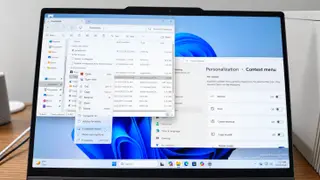
Microsoft has introduced a customizable right-click menu in the latest Windows Insider build, allowing users to add, remove, and reorder commands to reduce confusion. This update addresses longstanding issues with menu overcrowding and helps maintain quick access to frequently used tools. The feature is currently in testing and may roll out to all users before year’s end.
The customizable right-click menu in Windows 11’s latest Insider build allows users to fine-tune which commands appear based on file type and personal workflow. Features include toggling standard actions like “Send to” or “Rotate image,” managing app integrations such as Notepad or Photos, and reordering menu items for faster access. The update also lets users place core file operations (Cut, Copy, Paste) at the top or within the menu, and organize cloud storage options into dedicated sections. This level of control aims to balance simplicity with functionality.
This update could improve user efficiency for both casual and power users by reducing menu clutter and streamlining access to frequently used tools. Professionals relying on specific file operations or third-party apps may benefit from tailoring their context menus, potentially reducing workflow friction. However, widespread adoption may depend on how seamlessly the feature integrates into stable releases and whether it remains accessible to non-technical users.